Spirals
The Spiral tool lets you draw Archimedean spirals and other spirals with a constant divergence power factor. Other types of spirals (e.g. logarithmic) can be drawn using the Function Plotter extension.
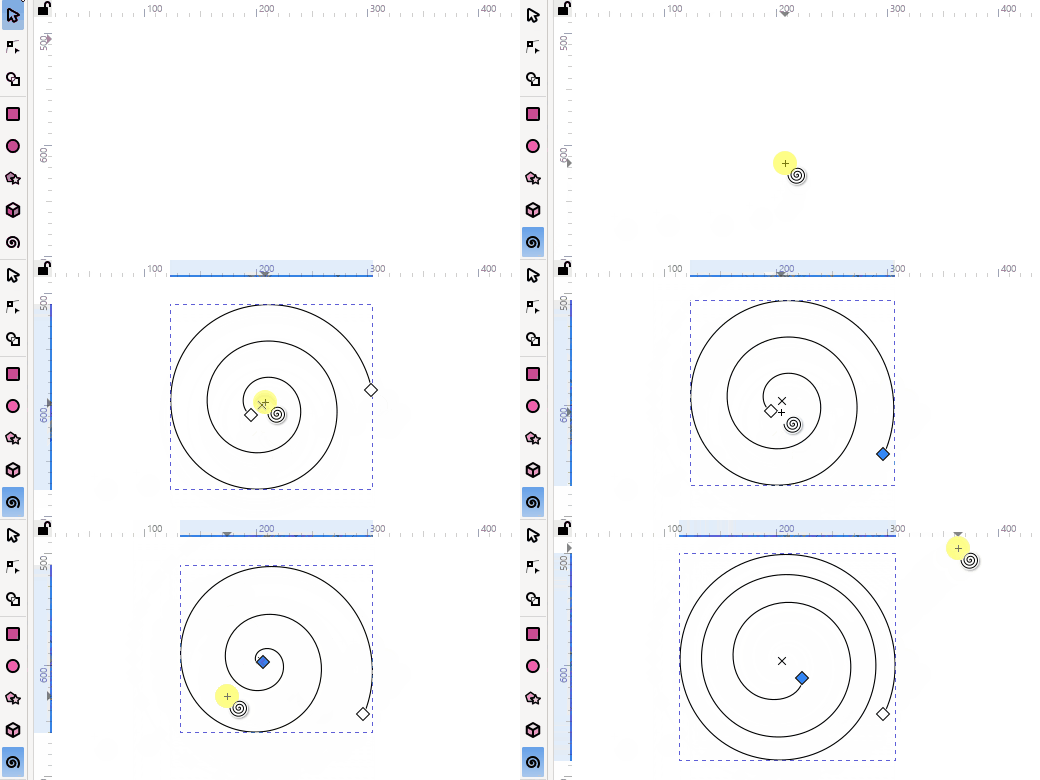
Create a spiral object
Select the Spiral tool from the main Toolbox along the left side of the window. Or use the keyboard shortcuts I or F9.
Click + Left Mouse Drag to draw a spiral. The center of the spiral will be located where you first clicked.
A modifier can be applied to Spiral creation.
Press CtrlCmd while dragging the spiral end handle, to rotate the Spiral in 15° steps. The default rotation steps can be changed in Inkscape Preferences Rotation snap angle.
Todo
fix this text link, after the Preferences section has been written.
To reverse the direction of the spiral use the transformation Flip Horizontal (h) or Flip Vertical (v) functions.
By default the spiral object inherits the tool’s own style (Fill:none, Stroke:black,width:1px). This can be changed in the Preferences’ Tools section. Or right-click on the Spiral tool icon, in the main Toolbox, to open its Preferences settings. Or CtrlCmdShiftP.
Todo
fix this text link, after the Preferences section has been written.
The Spiral tool’s style can be modified by:
Clicking on a color in the palette (Click to set or change the fill color, or ShiftClick to set or change the stroke color).
Adjusting the color in the Fill and Stroke Dialog.
Selecting a color with The Dropper Tool.
Copying and Pasting the style of another object.
Modify a spiral object with mouse
While the Spiral tool is enabled the spiral object will display diamond-shaped modification handles.
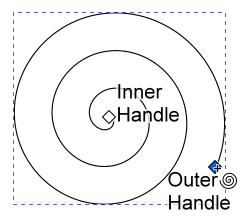
The spiral has two modification handles - an outer handle(spiral end) and an inner handle(spiral start).
Result |
How to Achieve |
|---|---|
Edit outer spiral turns in 15° steps |
Hold CtrlCmd while dragging the outer handle (Rotation snap angle) |
Rotate the spiral |
Hold Shift while dragging the outer handle along the direction of the path |
Resize the spiral |
Hold Shift while dragging the outer handle perpendicular to the direction of path |
Rotate the spiral preserving the radius |
Holding AltOptionShift while dragging the outer handle (does not resize the spiral) |
Rotate spiral in 15° steps |
Holding CtrlCmdShift while dragging the outer handle |
Return inner handle to center |
Press Shift + click inner handle |
Change divergence (spacing) |
Hold AltOption while dragging the inner handle vertically to increase(down) or decrease(up) |
Return divergence to one |
Press AltOption + click inner handle |
Todo
Fix Rotation snap angle link when Preferences section has been written
Clickdrag the center x handle to move the Spiral. Note the x handle may be hidden under the center diamond handle.
Modify a spiral object with keyboard
The cursor (arrow) keys can be used to move selected handles horizontally and vertically.
Press AltOption + arrow for small adjustments. Zoom in for even finer adjustments.
Press Shift + arrow for large adjustments.
See also
For more detail on using the AltOption and Shift modifier keys, see Transformations Section.
Warning
Adjustments made with the arrow keys fail to update the XML file. Also the Tool control bar Turns and Inner Radius entry boxes fail to change.
Work around:
Switch to the Selection tool and move the spiral one arrow keypress and then back again. This forces the entry boxes and XML to update.
With a spiral selected the [ or ] key will rotate the spiral in 15° steps.
The < (,) or > (.) key will shrink/enlarge a spiral (See Transformations Section ).
Note
With multiple objects selected, the keys will rotate and resize around the center of the selection area.
Tool controls bar

Turns: Number of turns (revolutions) of the spiral path
Divergence: Spacing between the spiral turns
Inner Radius: Unwind/Rewind the inner turns from the center
Restore to the default: Turns=3, Divergence=1, InnerRadius=0
Entry box arithmetic (+ add, - subtract , * multiply , / divide) is possible. Computation progresses from left to right.
- Understanding Spiral Divergence:
Divergence describes how quickly the radius of a spiral changes as the angle increases. It reflects the rate at which the spiral expands or contracts with each turn.
A divergence of 1 produces a uniformly spaced spiral — also known as an Archimedes’ spiral — where the gap between successive turns stays consistent.
Divergence less than 1 results in a spiral that tightens as it progresses outward, with decreasing distances between the coils.
Divergence greater than 1 leads to a spiral that loosens, expanding outward with increasing gaps between turns.
Adjustments with Object Properties dialog
Todo
revisit this part at a later point when the Object Properties chapter is done. (No object properties currently)
With the Selection tool enabled
The spiral can be modified using the transformation handles (See Object Transformations).
With Node tool and other shape tools enabled
The same handles are available as with the spiral tool enabled.
Note
When multiple shape objects are selected only the Node tool will display the modification handles.
Modify/view with XML Editor
Example Spiral
Name |
Value |
Units in mm (millimetres) |
|---|---|---|
inkscape:transform-center-y |
-1.4075964 |
|
inkscape:transform-center-x |
-1.4083655 |
|
d |
M 0.29974154,0.29974267 C… |
SVG path |
sodipodi:t0 |
0.081973173 |
inner radius |
sodipodi:argument |
-11.644569 |
angle of end pt.? |
sodipodi:radius |
19.654741 |
|
sodipodi:revolution |
1.7878424 |
number of turns |
sodipodi:expansion |
0.35795671 |
divergence |
sodipodi:cy |
0.29974267 |
spiral center point |
sodipodi:cx |
0.29974154 |
|
id |
path5 |
|
style |
fill: none;….. |
CSS style properties |
sodipodi:type |
spiral |
In Inkscape, the Spiral tool utilizes Sodipodi attributes to define spiral properties, particularly for parameters like the number of turns, radius and divergence. These parameters are stored using XML attributes prefixed with sodipodi: and inkscape: within the Inkscape SVG code.
When the SVG is reloaded into Inkscape these attributes are used to regenerate the SVG path d=”” attributes.
If exported as Plain SVG only the path will be saved (same as if applied Object to Path), if then reloaded into Inkscape the spiral will no longer be editable using the Spiral tool.
Todo
Examples{link} using spiral tool
Fill/gradient (odd/even)