View Menu
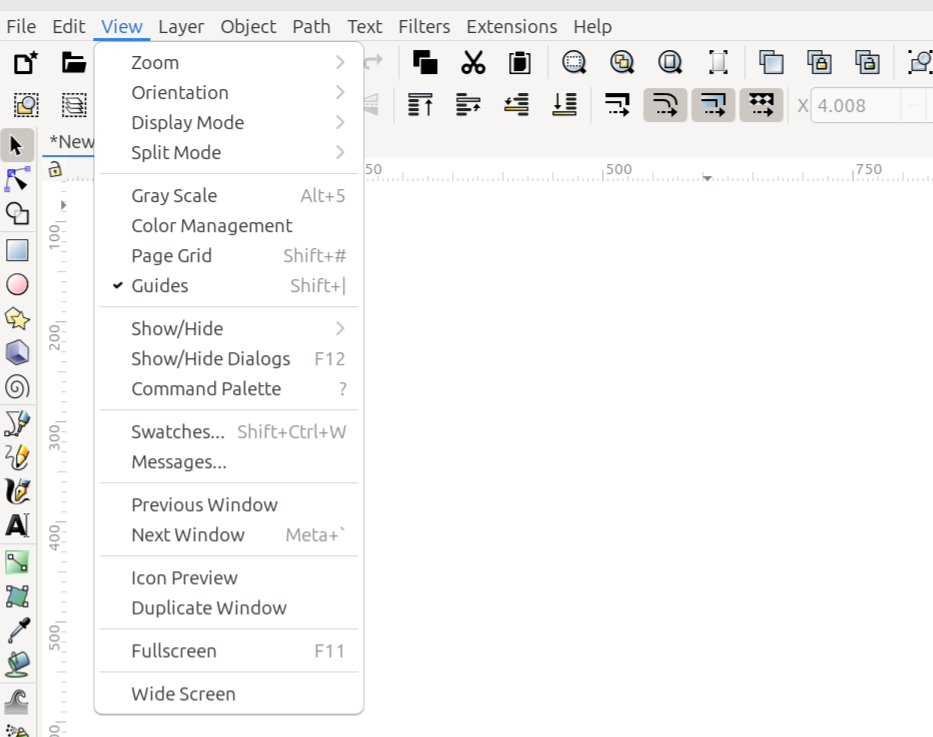
The View menu
The View menu offers options for setting up the interface in whatever way the user would like. The list below shows how they appear in the menu, along with a brief description of each item.
Command or Option |
What it Does |
|---|---|
Zoom (I guessed where Zoom will be in the manual.) |
Reveals a dropdown menu offering many different options for zooming the window |
Orientation (I guessed where Orientation will appear in the manual.) |
Reveals a dropdown menu offering several options for how the window is displayed |
Reveals a dropdown menu offering five display modes to choose from |
|
Split Mode (guessed about the manual location) |
Reveals a dropdown menu offering three choices for splitting the canvas into two sections |
Enables or disables Gray Scale mode |
|
Enables or disables Color Management mode |
|
Toggles the visibility of grids |
|
Toggles the visibility of guides |
|
Show/Hide (guessed manual location) |
Reveals a dropdown menu where users can choose which parts of the interface they would like to show or hide |
Show/Hide Dialogs (guessed manual location) |
Toggles whether all dialogs will temporarily be shown or hidden |
Displays the command palette |
|
Opens the Swatches dialog |
|
Messages… (not sure the manual location - not even a guess) |
Opens the Messages dialog (for developers) |
Previous Window (not sure the manual location - Interface > Canvas?) |
Opens the previously opened window, if more than one window is open (does not apply to tabs) |
Next Window (not sure the manual location - Interface > Canvas?) |
Opens the next window, if more than one window is open (does not apply to tabs) |
Icon Preview (not sure where this will be in the manual) |
Opens the Icon Preview dialog |
Duplicate Window (not sure where this will be in the manual) |
Opens the same document in another window |
Full Screen |
Toggles Full Screen mode |
Wide Screen (not sure where this will be in the manual) |
Places the commands bar along the right side of the window |
Todo
For all the items above where I wrote “I guessed….” or “not sure….”, we need to decide where these items will be covered in the manual, and correct the links, if I guessed wrong. Don’t forget to delete my comments, after the items are fixed.
READY FOR REVIEW