Filters Menu
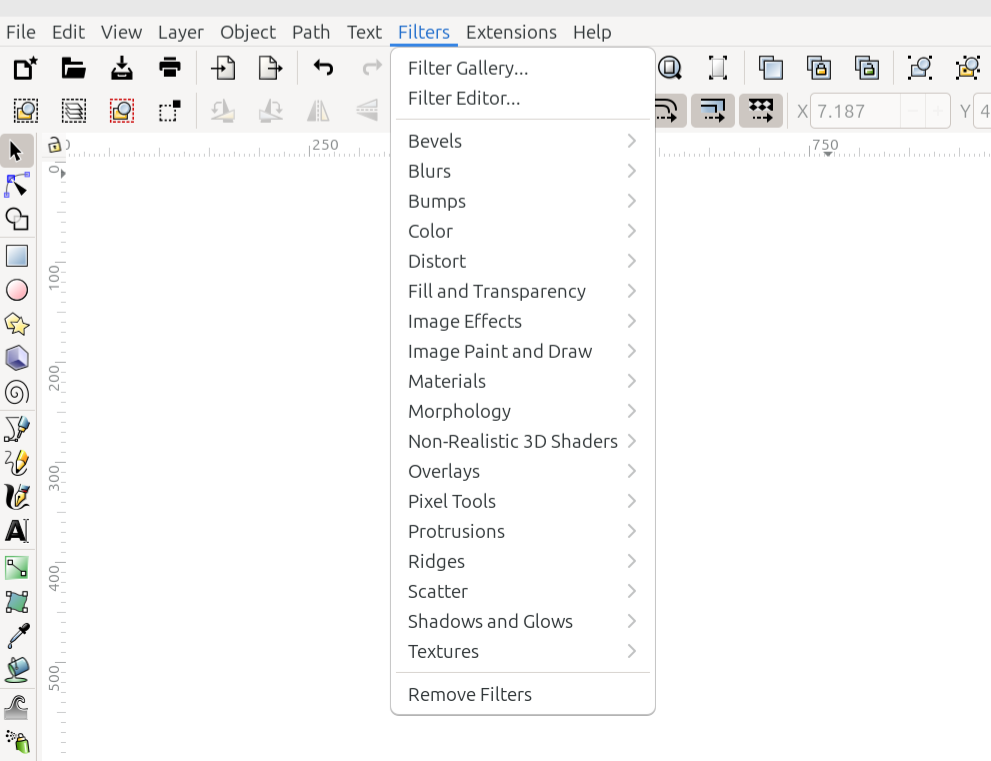
The Filters menu
The Filters menu contains both the filters which were installed with Inkscape, and any filters which the user may have installed later. Those that are installed with Inkscape are listed below, along with 3 other commands related to filters. To learn how to install new filters, please see the Filters section.
Command or Option |
What it Does |
|---|---|
Opens the Filter Gallery dialog |
|
Opens the Filter Editor |
|
Reveals a dropdown menu of all the filters in this category |
|
Reveals a dropdown menu of all the filters in this category |
|
Reveals a dropdown menu of all the filters in this category |
|
Reveals a dropdown menu of all the filters in this category |
|
Reveals a dropdown menu of all the filters in this category |
|
Reveals a dropdown menu of all the filters in this category |
|
Reveals a dropdown menu of all the filters in this category |
|
Reveals a dropdown menu of all the filters in this category |
|
Reveals a dropdown menu of all the filters in this category |
|
Reveals a dropdown menu of all the filters in this category |
|
Reveals a dropdown menu of all the filters in this category |
|
Reveals a dropdown menu of all the filters in this category |
|
Reveals a dropdown menu of all the filters in this category |
|
Reveals a dropdown menu of all the filters in this category |
|
Reveals a dropdown menu of all the filters in this category |
|
Reveals a dropdown menu of all the filters in this category |
|
Reveals a dropdown menu of all the filters in this category |
|
Reveals a dropdown menu of all the filters in this category |
|
Removes filters from the selected object |
READY FOR REVIEW