Edit Menu
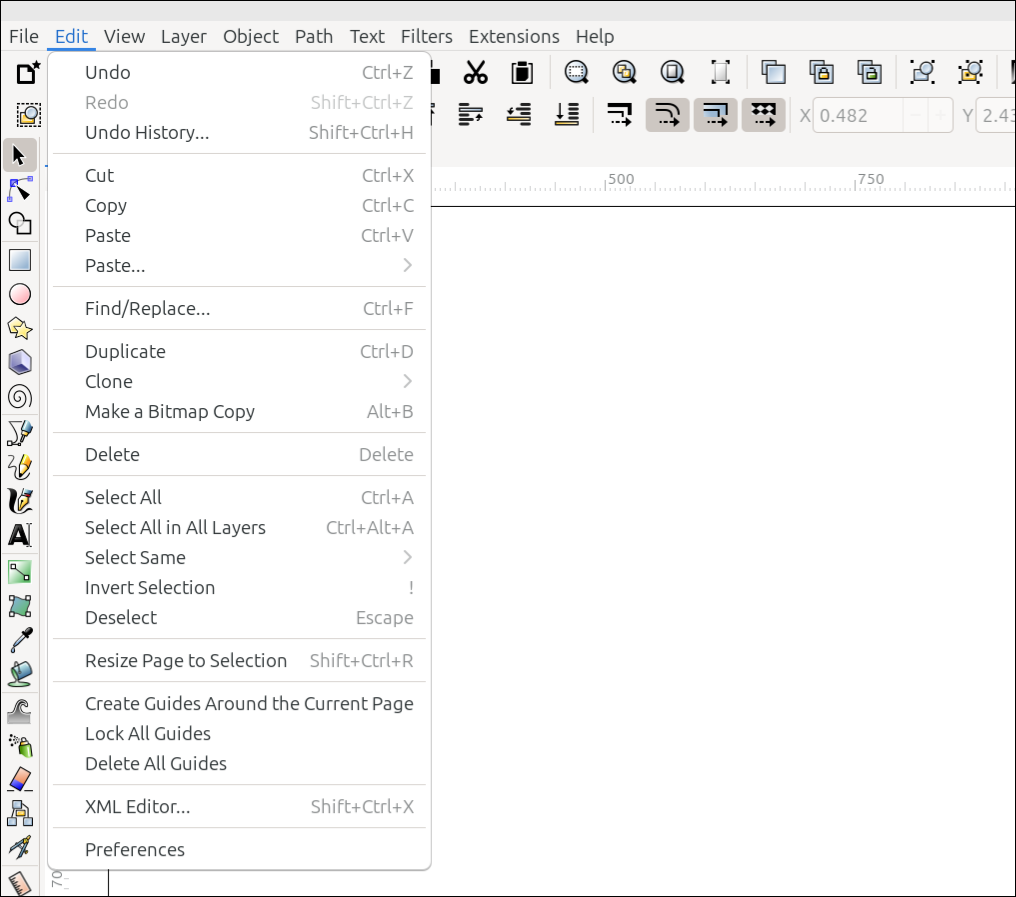
The Edit menu
Commands for editing a drawing are found in the Edit menu. They are listed below, with a brief description of what each of them does. Please follow the links to find detailed information about them.
Command or Option |
What it Does |
|---|---|
Reverts the last edit made on the canvas |
|
Reinstates the change that was previously reverted |
|
Opens the Undo History dialog |
|
Deletes the selection (after silently copying) |
|
Copies the selection |
|
Pastes the selection that was cut or copied |
|
Reveals a dropdown menu offering several paste options |
|
Opens the Find/Replace dialog (guessed link location) |
|
Duplicates the selection |
|
Reveals a dropdown menu offering several options related to cloning |
|
Places a PNG version of the selected object on the canvas (guessed manual/link location) |
|
Deletes the selection |
|
Selects everything from various areas of the canvas, depending on Preference choices |
|
Selects everything in all layers |
|
Reveals a dropdown menu offering several selection options |
|
Deselects the selection, and selects everything else |
|
Deselects the selection |
|
Changes the page size to match the selection on the canvas |
|
Creates four guides, one on each page boundary |
|
Locks all guides |
|
Deletes all guides |
|
Opens the XML Editor |
|
Opens the Preferences dialog |
Todo
Double-check Find/Replace, Make a Bitmap Copy, - I guessed where these link location will be in the manual. For Select All - fill in the correct Category under Preferences, after those categories have been created. Also delete my comments after those items are fixed.
READY FOR REVIEW